

If you’re trying to figure out whether your business is actually making money or just staying busy a profit and loss statement calculator is exactly what you need. Instead of wrestling with spreadsheets or guessing your real numbers, this tool gives you a clean snapshot of income, expenses, and net profit in seconds.
Let’s break it down so you can understand how it works and use it confidently.
What Is a Profit and Loss (P&L) Statement Calculator?
A profit and loss statement calculator is an online tool that helps you quickly compute your revenue, costs, and net profit for a specific time period.
It automates the math behind the P&L so you don’t have to manually crunch numbers.
Core Components of a P&L Calculator
A typical calculator uses the same basic structure as a standard P&L statement:
| Component | Meaning |
|---|---|
| Revenue | Total money earned |
| Cost of Goods Sold (COGS) | Direct costs to create or deliver products/services |
| Gross Profit | Revenue – COGS |
| Operating Expenses | Rent, salaries, software, utilities, marketing, etc. |
| Net Profit | Gross Profit – Operating Expenses |
Profit and Loss Formulas (Simple and Clear)
Here are the formulas most calculators use:
- Gross Profit = Total Revenue – COGS
- Operating Profit = Gross Profit – Operating Expenses
- Net Profit = Operating Profit – Taxes – Misc. Costs
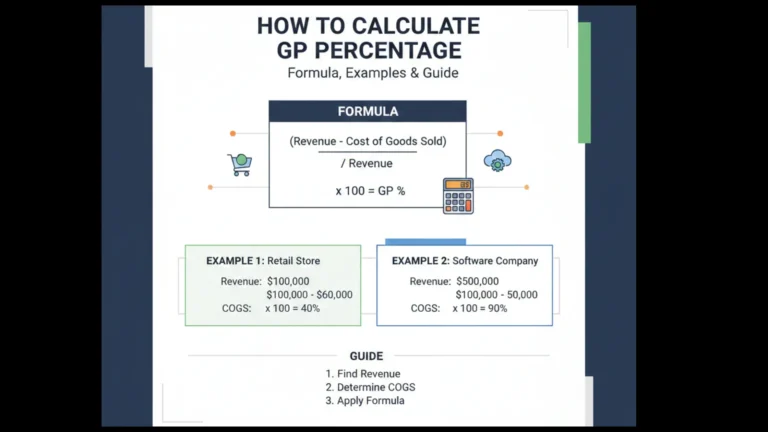
- Profit Margin (%) = (Net Profit ÷ Revenue) × 100
Real-World Example (With Numbers)
Let’s say you run an online store. Here’s a quick monthly breakdown:
Revenue: £25,000
COGS: £14,000
Operating Expenses: £7,500
Taxes: £500
Now plug in the formulas:
- Gross Profit: £25,000 – £14,000 = £11,000
- Operating Profit: £11,000 – £7,500 = £3,500
- Net Profit: £3,500 – £500 = £3,000
- Profit Margin: (3,000 ÷ 25,000) × 100 = 12%
A calculator performs all this instantly—and without errors.
Why Use a Profit and Loss Statement Calculator?
Here’s the thing: businesses struggle not because they don’t make money, but because they don’t track it properly.
A calculator solves that by helping you:
- Avoid spreadsheet mistakes
- Get clear visibility into your finances
- Make smarter budgeting and pricing decisions
- Plan for taxes in advance
- Show investors or lenders reliable numbers
- Understand if you’re actually profitable or just surviving
How to Use a Profit and Loss Statement Calculator (Step-by-Step)
This is the exact process most tools follow:
- Enter your total revenue for the period (monthly, quarterly, yearly).
- Add your COGS—raw materials, wholesale costs, logistics, etc.
- Fill in operating expenses such as rent, salaries, ads, software.
- Enter additional costs like interest, taxes, or fees.
- Click Calculate
- Review your P&L output—gross profit, net profit, and margins.
- Download or export the report (PDF, CSV, Excel depending on the tool).
Benefits of Using a P&L Calculator
- Saves time compared to manual accounting
- Helps prevent financial miscalculations
- Works for small businesses, freelancers, startups, agencies, and e-commerce owners
- Provides quick financial insights for decision-making
- Helps you build investor-ready statements
- Supports budgeting and cost-cutting strategies
Best Profit and Loss Statement Calculators (With Pros & Cons)
1. QuickBooks P&L Calculator
Pros:
- Accurate and industry-standard
- Integrated with bookkeeping
- Great for growing businesses
Cons: - Paid tool
- Might feel heavy for beginners
2. FreshBooks Profit & Loss Generator
Pros:
- Very easy to use
- Clean interface
- Good for freelancers and agencies
Cons: - Fewer advanced reporting features
3. Shopify Profit Calculator
Pros:
- Ideal for e-commerce stores
- Works with sales and cost data automatically
Cons: - Only for Shopify users
4. Wave Accounting (Free)
Pros:
- 100% free
- Covers basic P&L and invoicing
Cons: - Limited features for scaling businesses
5. Spreadsheet-Based P&L Calculators (Google Sheets / Excel Templates)
Pros:
- Fully customizable
- Free or very low cost
Cons: - Requires basic spreadsheet skills
- Easy to break formulas if you’re not careful
Example Table You Can Use in Your Blog (Visual-Ready)
| Item | Amount |
|---|---|
| Revenue | £25,000 |
| COGS | £14,000 |
| Gross Profit | £11,000 |
| Operating Expenses | £7,500 |
| Taxes | £500 |
| Net Profit | £3,000 |
FAQs
What does a Profit and Loss Statement Calculator do?
It calculates your revenue, expenses, and net profit automatically so you can understand your financial performance without manual math.
Do Small Businesses Need a P&L Calculator?
Yes. It helps you track cash flow, spot losses early, and make smarter decisions.
Can a P&L Calculator Replace an Accountant?
Not fully. It gives you quick insights, but accountants help with strategy, compliance, and detailed analysis.
How often Should I Calculate Profit and Loss?
Most businesses do it monthly, but weekly tracking is even better for e-commerce and service businesses.
Is a Profit and Loss Calculator easy to use?
Yes. You only need to input your income and expenses the calculator does the rest.
Summary
A profit and loss statement calculator helps you understand your business’s financial health in minutes. It simplifies the entire process revenue, costs, profit, and margins so you can make confident decisions without digging through spreadsheets. Whether you’re running an online store, a small agency, a startup, or a local service business, this tool gives you the clarity you need to grow sustainably.